Connect Cluster
After creating a Kubernetes cluster in Vietnix Cloud, you need to connect to it from your local environment in order to manage workloads, deploy applications, and monitor resources. This is done using the kubeconfig file.
Requirements
Before connecting to your cluster, make sure that:
- You already have a Kubernetes cluster created in Vietnix Cloud.
- You have kubectl installed on your local computer. Install kubectl
- You can access the Vietnix Cloud Dashboard with your account.
1. Download kubeconfig
-
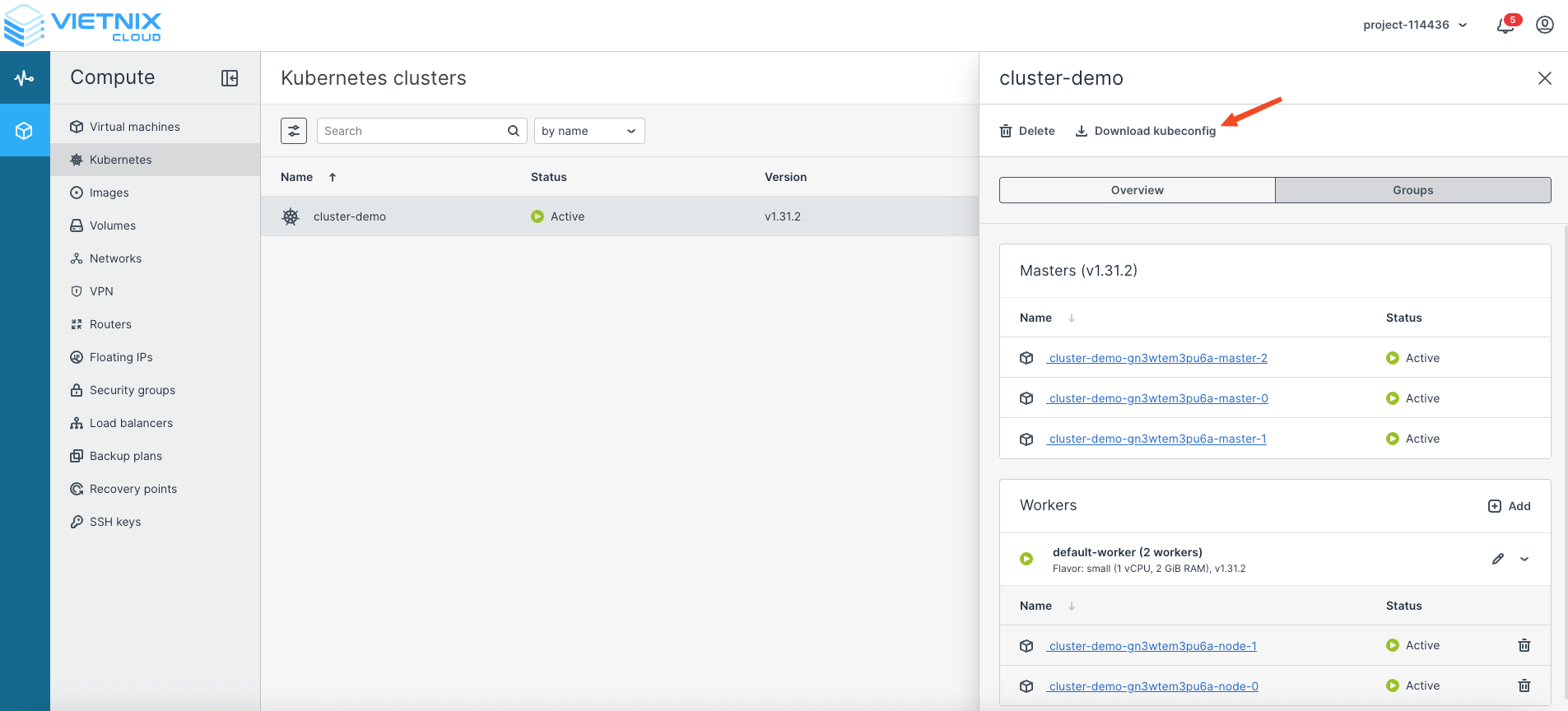
Open the Vietnix Cloud Dashboard.
-
Navigate to your Kubernetes cluster.
-
Click Download kubeconfig to download the cluster’s kubeconfig file to your computer.
2. Configure kubeconfig locally
After downloading the kubeconfig file, there are several ways to configure it on your local machine. Choose the method that best fits your workflow.
Method 1: Export kubeconfig as an environment variable
Temporarily set the path of the kubeconfig file in your terminal session:
export KUBECONFIG=/Users/dinhtuan/.kube/cluster-demo-05_09_2025_10_03.kubeconfig
kubectl get nodes
This method only works for the current terminal session. If you open a new session, you need to run the export command again.
Method 2: Use the --kubeconfig flag with kubectl
Specify the kubeconfig file directly each time you run a command:
kubectl get nodes --kubeconfig=/Users/dinhtuan/.kube/cluster-demo-05_09_2025_10_03.kubeconfig
Useful when you manage multiple clusters with different kubeconfig files.
Method 3: Set kubeconfig as the default
Move or copy the kubeconfig file to the default location (~/.kube/config):
mv ~/Downloads/cluster-demo-05_09_2025_10_03.kubeconfig ~/.kube/config
kubectl get nodes
With this method, kubectl automatically uses the config file without needing to specify it each time.
Example: Successful connection
If everything is configured correctly, running kubectl get nodes should display the nodes in your cluster:
dinhtuan@Mac-mini-cua-inh awx.vietnix.vn % kubectl get nodes --kubeconfig=/Users/dinhtuan/.kube/cluster-demo-05_09_2025_10_03.kubeconfig
NAME                                 STATUS   ROLES    AGE   VERSION
cluster-demo-gn3wtem3pu6a-master-0   Ready    master   84m   v1.31.2
cluster-demo-gn3wtem3pu6a-master-1   Ready    master   84m   v1.31.2
cluster-demo-gn3wtem3pu6a-master-2   Ready    master   84m   v1.31.2
cluster-demo-gn3wtem3pu6a-node-0     Ready    <none>   83m   v1.31.2
cluster-demo-gn3wtem3pu6a-node-1     Ready    <none>   83m   v1.31.2
Best Practices
- Backup kubeconfig files: Keep a backup of your kubeconfig files in case you need to reconfigure your environment.
- Use contexts: When working with multiple clusters, configure contexts using kubectl config get-contexts and kubectl config use-context (or tools like kubectx).
- Secure kubeconfig: Treat the kubeconfig file as a sensitive credential — do not share it or commit it to version control.
- Use RBAC: Ensure the cluster enforces Role-Based Access Control (RBAC) to limit permissions for different users or services.